low on stock - get yours now!
RearView Selfie Screen
YOU SAVE $67.00 (52% OFF)
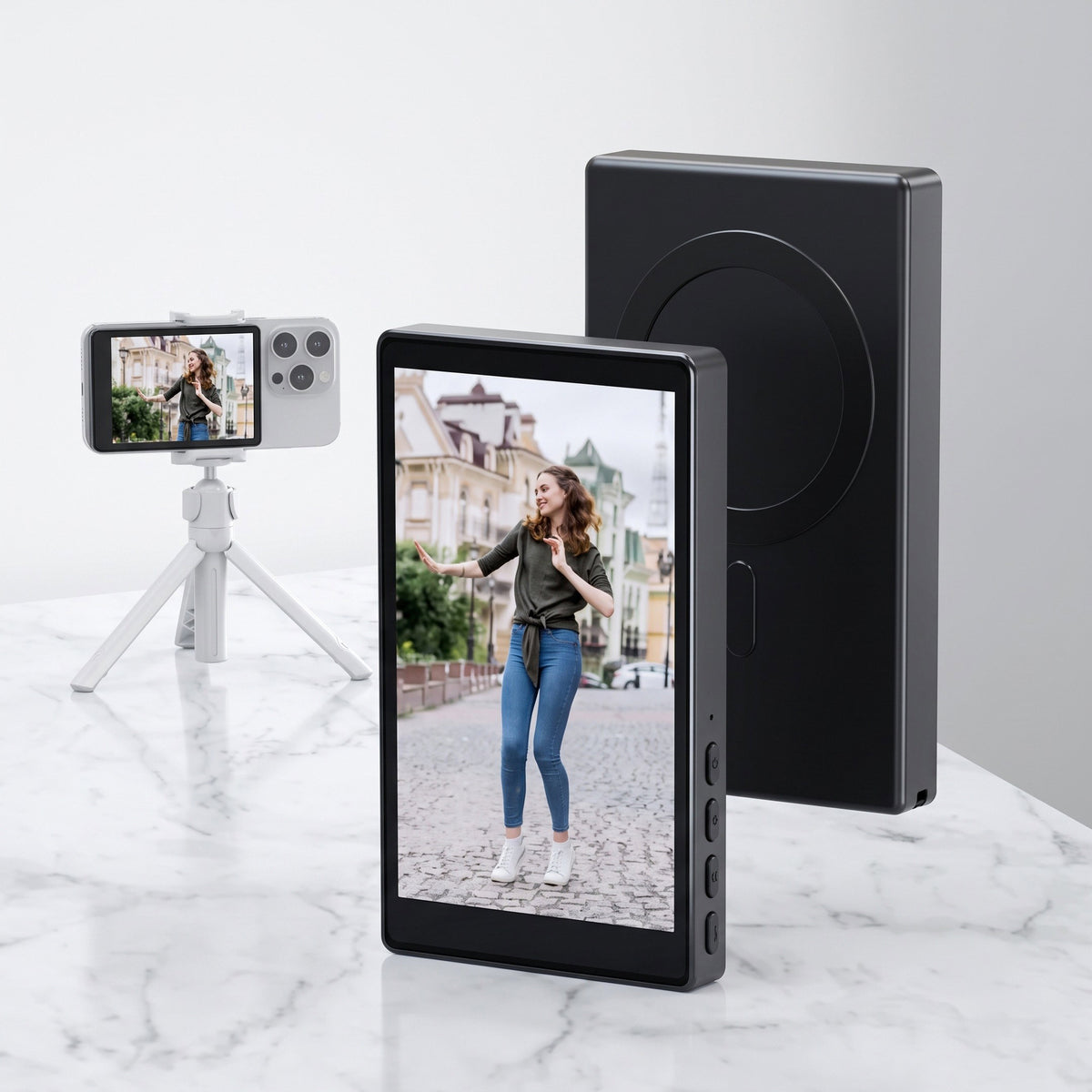
See Yourself. Shoot With Your Best Camera. Stop guessing what’s in frame. This wireless rear camera screen lets you see yourself while using your phone’s high-quality rear camera — so you can frame the shot, hit record and create with confidence.
➤ Wireless & Easy to Connect
➤ Magnetic & Pocket-Sized
➤ This product does not support iPhone 17
⚠️ Low Stock, ready to ship
Couldn't load pickup availability
Shipping & Returns
Shipping & Returns
Please allow up to 2-4 business days for processing before your order ships.
Estimated Delivery Times
Depending on your geographic location, the delivery may take approximately 8-14 business days.
*Please note, estimated shipping times are not guaranteed.
Return Policy
NTHAT2 will accept exchanges & returns within 30 days of receiving.
If it doesn't live up to your expectations, then send it back for a refund. No questions asked; that's just how we roll.
How Does It Work?
How Does It Work?
The NTHAT2 RearView Selfie Screen wirelessly mirrors your phone’s display onto a compact external screen, letting you see exactly what you’re capturing while using your higher-quality rear camera. Simply connect, attach it magnetically to your phone, and you’re ready to shoot.
This product does not support iPhone 17.
No more guessing if you’re centred, in focus, or even in the frame. See your shot in real time while capturing the quality your rear camera was made for.
Whether you’re filming content, taking selfies, travelling solo or capturing a group moment, frame it, see it, and get the shot right the first time!
Key Features
Key Features
- Compact & Lightweight – Just 104.5 × 60 × 10 mm and only 100g, making it easy to carry anywhere.
- Dual-Band WiFi – Supports both 2.4GHz & 5GHz for a reliable wireless connection.
- Magnetic Attachment – Built with magnet, silicone and ABS for quick and convenient mounting.
- 1800mAh Rechargeable Battery – Designed for portable, cable-free shooting.
- USB-C Charging – Simple, convenient charging with a standard Type-C connection.
- Wide Compatibility – Compatible with supported iOS (iOS system 9.0 or above); Android (2.0 or above).
If you purchase any product in our company, if you have quality problems or send them less, please contact us in time. We will solve the problem as soon as possible and give you a satisfactory reply:
1. Within 7 days of receipt (the date of receipt of the waybill) If you find a product with functional failure or quality problems, please contact us in time; it will not be accepted after the deadline, and the case of false reports will not be accepted once verified;
2. Because it is impossible for the customer to check all products one by one after receiving the goods, we allow us to find quality problems within 7 days after receiving the goods. We can exchange or return the goods for you.
3. We will try our best to meet the customer's specification of product colors or styles, but may not be 100%. If the color and style do not match, or if there are a shortage of several items, the refund will not be given (the customer may indicate that the goods cannot be distributed as required and the goods are out of stock);
4. The goods will be shipped on the same day when payment is paid before 16 o'clock. If there is no stock, they will be notified from 19 to 21 o'clock. Under normal circumstances, the goods will be shipped 48 hours. If there is no stock or other special circumstances, the goods will not be shipped 48 hours;
5. The buyer makes the reason that the product has no quality problems in actual product, so we will not return or exchange; if the wrong product is sent, it is a return process;
6. When receiving the goods, regardless of whether the outer packaging box is damaged, the customer needs to open the box for inspection. If the product is damaged due to transportation problems, please ask the relevant transportation company to issue a certificate stamped with the official seal and provide this certificate to us. We will assist the customer in making the claim; if the goods are damaged or lost due to logistics, we will not bear the relevant responsibility.
7. All customers please protect the complete product packaging, the complete accessories or related information. If the product itself has quality problems, we will exchange the goods within the specified time; (The customer shall bear the separate freight fee, and it is recommended to replace the goods next time)
8. If the returned product packaging is incomplete, accessories or related information is incomplete; repair or modification without authorization; fail to use and store according to normal methods; exceed the product warranty period; if the returned product is labeled and falsified, we will not bear the return or exchange;
9. When a customer finds product quality problems, please use ordinary express to return the goods to our company. The customer will advance the freight. After receiving the goods, the company will subsidize the freight and actual product costs according to the express list. If the customer returns the goods directly without communicating with the customer service, we will not accept it. Thank you for your cooperation, communication starts from the heart.
Shenzhen Henghuaxin

Free Shipping
90-Day Guarantee
12 Months Warranty
Your Best Camera. Now You Can See It.
Your phone’s best camera is on the back — but taking selfies or filming yourself with it usually means guessing the frame. The RearView Selfie Screen gives you a live view while you shoot, so you can frame it right, capture better quality and stop filming blind or depending on somebody else.
Just you, your phone and a clear view of what you're creating!
Frame It Right the First Time
Set up your phone, switch to the rear camera and step into the shot knowing you can still see what's happening. Instead of recording first and checking afterwards, the 4.02" screen mirrors your phone display so you can adjust your position and framing while you're actually in front of the camera.
Whether you're filming a recipe, workout, vlog or simply trying to take a great photo on your own, you get more control over the result—and fewer moments ruined because you weren't quite in frame.
Made for More Than Selfies
From solo travel and nights out to vlogs, tutorials and everyday content, see exactly what you’re capturing without switching back to your front camera.
Clever by Design.
Compact, magnetic and rechargeable, with screen rotation and
brightness adjustment.
Small Enough to Go Anywhere
At just 10.45 × 6 × 1 cm, thenThaT2 RearView Selfie Screen gives you a 4.02" viewing screen in a compact, lightweight design. Slip it into your pocket or bag and take it wherever you're shooting — without adding bulky equipment to your setup.
Over 15k Units Sold & Here's What Our Customers Are Saying
Verified
Verified
Verified
Verified
Verified
Verified
Verified
VerifiedFrequently Asked Questions
How do I use this?
1. Power On the Screen
Use the power switch to turn on your Selfie Screen. Once powered on, it’s ready to connect to your phone.
2. Open Screen Mirroring on Your Phone
Open your phone’s quick-access menu by swiping down from the top of the screen.
On iPhone, select Screen Mirroring.
On Android, look for Screen Projection, Wireless Projection, Cast, Smart View, or a similar option. The name may vary depending on your device.
3. Connect to the Selfie Screen
From the list of available devices, select “iScreen_p2p.”
The first time you connect, you may be asked for a verification code. Enter: 1234
Once connected, your phone's display will appear on the Selfie Screen.
4. Attach & Position
Attach the Selfie Screen magnetically to the back of your phone and position the display so it's facing you.
Open your phone's camera and switch to the rear camera. You can now see your live camera view on the Selfie Screen while taking photos or recording videos.
5. Adjust Your View
Use the controls on the Selfie Screen to customise the display:
↻ Screen Rotation — Rotates the display 180°.
▣ Display Ratio — Switches between full-screen and 1:1 display modes.
Now frame yourself, adjust your angle and shoot using your phone's higher-quality rear camera.
Charging
Charge the Selfie Screen using the USB-C port. The red indicator light stays on while charging and switches off when charging is complete.
For best results, the manufacturer recommends charging the device while it is switched off.
How does it stick?
The RearView Selfie Screen uses a built-in magnetic attachment to securely connect to compatible phones or magnetic cases. Simply place it on the back of your phone and it snaps into position — no glue or permanent adhesive required.
Does it need to stay connected to a cable while I use it?
No. The RearView Selfie Screen has a built-in rechargeable 1800mAh battery, so you can use it wirelessly once charged.
Will it show exactly what my phone camera sees?
The screen mirrors your phone's display, allowing you to see your framing in real time while using your rear camera.
What if I’m not satisfied with my purchase?
We want you to love your nThaT2 find. If you're not completely satisfied, you can return it within 10 days of delivery for a refund, even if there's nothing wrong with the product.
The item must be returned in its original condition with all accessories and packaging. Return shipping costs are the customer's responsibility.
Is It Right for Your Phone?
The RearView Selfie Screen is designed for supported phones capable of compatible wireless screen mirroring. The supplied specifications list support for iOS 9.0+, Android 2.0+, HarmonyOS 3.0+ and MagicOS 4.0+, but operating-system compatibility alone should not be treated as a guarantee for every individual handset.
This product does not support iPhone 17.
For magnetic attachment, it works best with a compatible magnetic phone or magnetic case. If your case doesn't provide suitable magnetic attachment, you may need to remove it or use a compatible magnetic accessory.
For charging, use the USB-C input at the specified 5V/1A. The manufacturer's instructions recommend charging the device while switched off. The red charging indicator remains illuminated while charging and switches off once charging is complete.